Microsoft Copilot Review: A Powerful AI Assistant
+
Table of Contents
- 1 What Is Microsoft Copilot?
- 2 Microsoft Copilot Apps
- 3 Uses of Microsoft Copilot
- 3.1 1. Microsoft Copilot on Windows
- 3.2 2. Microsoft Copilot in Edge
- 3.3 3. Microsoft Copilot in Word
- 3.4 4. Microsoft Copilot in Excel
- 3.5 5. Microsoft Copilot in PowerPoint
- 3.6 6. Microsoft Copilot in Outlook
- 3.7 7. Microsoft Copilot in Teams
- 3.8 Key Features of Microsoft Copilot
- 3.8.1 1. AI-Powered Conversations
- 3.8.2 2. Idea Generation
- 3.8.3 3. Web-Based Research
- 3.8.4 4. Image Generation
- 3.8.5 5. Voice Interaction
- 3.8.6 6. File Assistance
- 3.8.7 7. AI Agents
- 3.9 Benefits of Microsoft Copilot
- 3.10 Is Microsoft Copilot Useful for SEO?
- 3.11 Limitations to Consider
- 4 Final Thoughts
The integration of AI is expanding how users work, how they search for information, how they create content, and how they manage their day-to-day activities. The quantity of choices for AI assistants grows each day. Microsoft’s entry has become interesting to users for various reasons. An interesting reason for some is that it integrates with the world’s most-used software.
In this review of Microsoft Copilot, we’ll look at what the AI assistant does, the apps it can work with, its best features, important pros, main cons, and who can benefit the most from using it.
What Is Microsoft Copilot?
Microsoft Copilot is built on Microsoft’s AI technology. It is built as a digital assistant to help you with multiple tasks. It answers questions, provides ideas, helps with content generation, data analysis, data summarization, image creation, and helps with productivity tasks.
In comparison to traditional chatbots, Copilot’s connectivity with Microsoft’s ecosystem is its biggest strength. The availability of Copilot may vary with the version and subscription of the account, but users are able to access Copilot through the web, Windows, mobile apps, Edge, and the Microsoft 365 apps. This means Copilot can be used to answer simpler day-to-day questions and more complex professional function tasks.
An example of how Copilot could be used to address day-to-day tasks is a student asking Copilot to summarize study notes and a marketer brainstorming campaign ideas. An example of how Copilot could be used to address more complex professional function tasks is a businessperson summarizing emails and meetings and an SEO specialist helping to analyze spreadsheets used for content planning.
Microsoft Copilot Apps
Microsoft Copilot works across multiple platforms and apps.
| App / Platform | Primary Function | Useful Features |
|---|---|---|
| Windows | Everyday AI Assistant | Chat, Voice, Vision, File Assistant |
| Microsoft Edge | Research Assistant | Webpage Assistant, Question Answering, Summaries |
| Word | Writing Assistant | Text Builder, Text Rewriter, Text Summarizer |
| Excel | Data Analysis Assistant | Data Analysis, Recommendations, Insights |
| PowerPoint | Presentation Assistant | Presentation Ideas, Slide Builder, Organizer |
| Outlook | Email Productivity Assistant | Email Responder, Summary Builder |
| Teams | Meeting Assistant | Meeting Summarizer, Meeting Insights |
| Mobile App | AI Assistant on the Go | Chat, Voice Assistant, Search, AI Creator |
| Web App | General-Purpose AI | Research, Writing, Brainstorming, Idea Assistant |
Uses of Microsoft Copilot
1. Microsoft Copilot on Windows
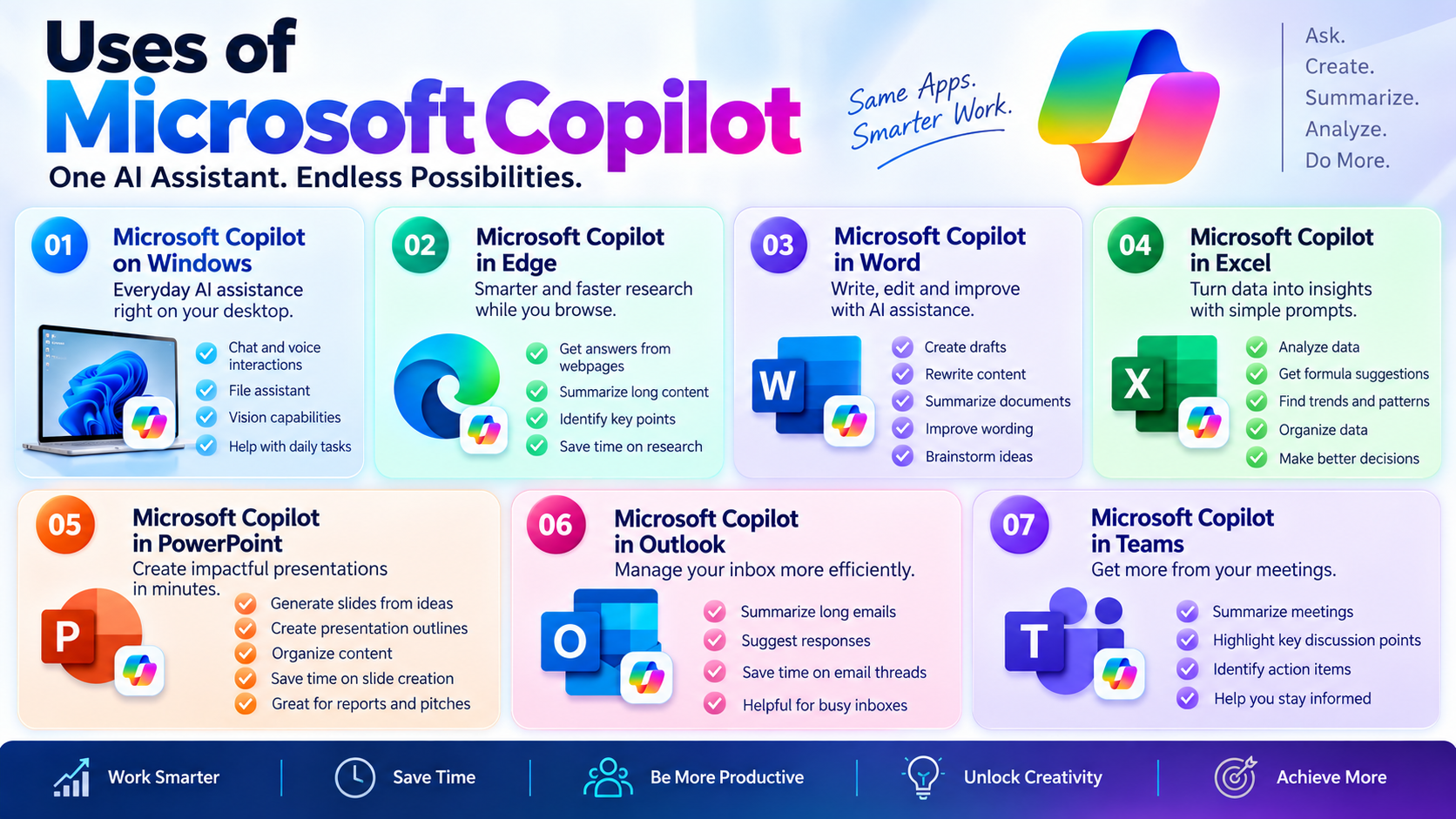
Windows users have direct access to AI assistance, making it convenient for day-to-day tasks.
Voice interactions, idea prompts, and file assistant features are available. The assistant also has vision capabilities for contextual assistance based on what the user is interacting with.
This elevates the assistant beyond a simple question-and-answer tool. It can assist in day-to-day tasks on the desktop.
For people with a PC as their primary work tool, this is a valuable differentiator for the assistant.
2. Microsoft Copilot in Edge
Another way to interact with the assistant is via Microsoft Edge.
For the assistant to be of use during research, users are able to get answers to queries about the webpage or any other supported content. This is particularly useful for long or tedious research.
Rather than reading every chunk of the text, using the assistant for key point identification and digesting the original document is much more efficient.
For researchers, students, writers, and SEO, this significantly shortens the aggregate time for information gathering.
3. Microsoft Copilot in Word
Word is one of the most useful programs to test AI assistance.
You can get AI to perform tasks like making drafts, rewriting paragraphs, creating summaries, combing through documents, finding wording or phrasing improvements, and even brainstorming. Instead of starting a new document, you explain how you want the opening document and use the AI to make the draft for you.
Content writers and marketers can shave some time off their initial drafting. However, they should not just rely on the assistance of AI to write for them. Oftentimes, the output of an AI is neither clear, concise, nor grammatically correct. There are many improvements that can be made.
4. Microsoft Copilot in Excel
Large and complex data matrices rely heavily on the use of AI assistants.
Users can describe what they want to the AI in plain English as opposed to using a dozen complex commands to get the data in the way that they want. The AI can make suggestions on the organization of the data and about the formulas, as well as explain and report on the patterns and trends that it has identified.
The business analyst, the marketer, the finance person, the SEO person, anybody who works with performance or keyword data, can benefit from the improvements made to the productivity of the assistant.
5. Microsoft Copilot in PowerPoint
Even though PowerPoint presentations may be easier, they still take a considerable amount of time. As you start to organize information and outline the presentation, you will begin to see a repetitive cycle of slide creation.
Microsoft Copilot has the potential to radically improve this cycle by creating slides from ideas and instructions.
You can use AI to brainstorm an outline as well.
6. Microsoft Copilot in Outlook
Email has become a major blocker for most people in their professions.
Copilot can help summarize lengthy emails and even suggest responses. It can save time for the user when they do not wish to read through all the messages.
This is especially helpful for users with lots of emails or who have many conversations for their business.
7. Microsoft Copilot in Teams
Sometimes it can be helpful for writing meeting summaries, as it can help recall some notes from meetings.
It can help provide meeting discussion points and suggested tasks to follow up on.
Also Read- Grok AI Review: The Ultimate AI Powerhouse
Key Features of Microsoft Copilot
1. AI-Powered Conversations
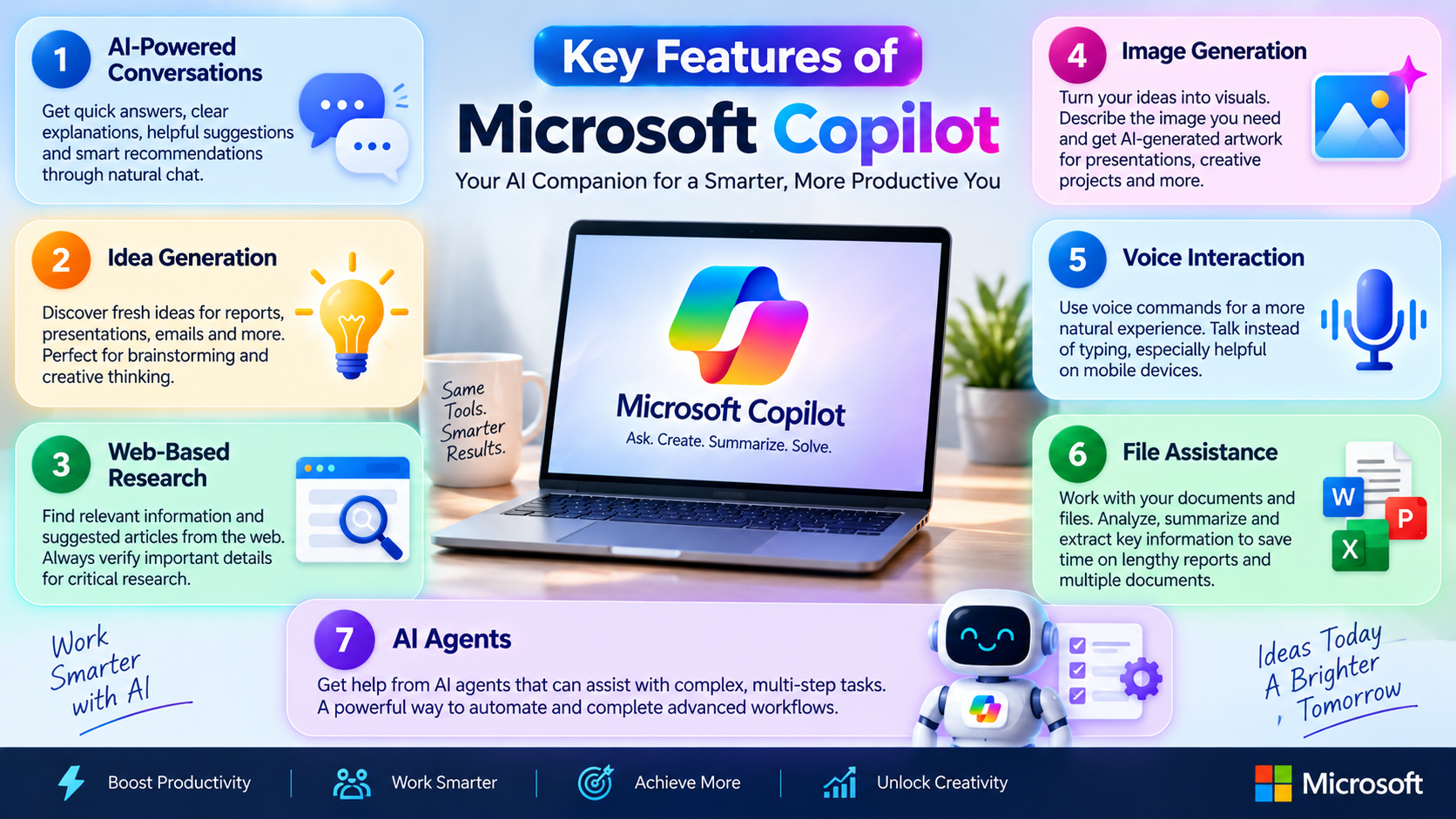
It can help answer questions and even suggest answers. The interface can be used to suggest explanations, suggestions, or recommendations.
2. Idea Generation
It can suggest ideas for various written formats, including reports, presentations, and email drafts.
The feature can help users brainstorm ideas for written formats.
3. Web-Based Research
The assistant can suggest articles on the web. For important research, users should independently verify the information.
4. Image Generation
It can help generate images.
AI image generators let users describe a desired image and receive an image. This technology can help with brainstorming or other ideas that require digital art.
5. Voice Interaction
Having AI assistants take voice commands encourages natural AI interaction and reduces the need for typing lengthy prompts, especially on mobile devices.
With voice commands and a natural conversation, users won’t have to try to formulate a prompt and use only their keyboard.
6. File Assistance
Document and file interaction is an extremely useful feature, as users bypass most of the lengthy document interaction and, with supported documents and files, the assistant can analyze and extract important information.
This feature is useful and can save a lot of time for users who have to use and interact with multiple documents and reports.
7. AI Agents
The addition of AI agents is another direction this assistant and similar products can take. These AI agents provide interactive assistance for the completion of complex tasks.
Current and future complex tasks assistants will be useful for completing work that involves several steps.
Benefits of Microsoft Copilot
These AI assistants are easy to use and summarize quickly. Users already familiar with and working in Microsoft products will appreciate the assistant even more.
- Saves time: Repetitive tasks such as summarizing, drafting, brainstorming, and organizing information can be completed much faster.
- Easy to use: The natural-language interface means you don’t need advanced technical knowledge.
- Microsoft integration: Users already working with Microsoft’s software can access AI assistance within familiar applications.
- Improves productivity: Instead of spending time on routine work, users can focus more on strategy, creativity, and decision-making.
- Useful across industries: Students, marketers, writers, business owners, developers, researchers, and office professionals can all find practical applications.
- Available across devices: The combination of desktop, web, and mobile access makes the assistant convenient for different workflows.
Also Read- Zipline: The Powerful Rise of Drone Delivery
Is Microsoft Copilot Useful for SEO?
For SEO professionals, the platform can be a useful supporting tool.
It can help with generating content ideas, creating outlines, organizing keyword data, doing research, writing content briefs, rewriting, and analyzing data stored in spreadsheets.
For example, an SEO specialist can have it create an organized group of topics as a replacement for a large keyword list, or an initial content outline.
Microsoft Copilot should never be used to substitute for keyword research, search intent, competitor analysis, technical SEO, or appropriate editorial judgment.
The best strategy is to see AI as a productivity tool but leave the frame and command in your hands.
Limitations to Consider
While it is incredibly useful, Microsoft Copilot still has its drawbacks.
The quality of the assistant’s responses mainly stems from the context provided by the user. Generally, more context results in better responses, and less context leads to worse responses.
Generated answers may also contain false, outdated, or just plain incorrect information. AI can make mistakes, and you should always do your due diligence before sharing information professionally.
Common sense also dictates that not all features may be available to all users. Your device may limit you.
It is also critical that businesses consider the pooled AI tech tools and policies when using the software with company information.
Final Thoughts
Microsoft Copilot does so much more than just be a standard AI chatbot based on its currently available apps, features, and add-ons.
Its greatest strength is the wraparound of its AI and productivity application offering. Users can seamlessly navigate from research to writing, from analysis to presentation to email and team collaboration without having to change their workflow.
It is not likely to remove the need for human judgment and skills. Its greatest value will be in helping people be more effective and productive with their time and in removing the labor from redundant activities.
In summary, Microsoft Copilot is a powerful aid for heavy users of the Microsoft productivity ecosystem.
Frequently Asked Questions
-
Is Microsoft Copilot easy to use?
It’s conversational interface allows the AI to take commands and understand them without having to use a rigid structure, making it accessible for beginners.
-
Can Microsoft Copilot write articles?
It is able to write articles, but it is recommended that articles being written by it be human edited prior to publishing.
-
Can Microsoft Copilot analyze Excel data?
Microsoft Copilot can analyze Excel data and can assist with the understanding of a data set and identify patterns for the user as well as work with formulas and provide insights for the data.
-
Is Microsoft Copilot useful for students?
It is great for students due to its brainstorming capabilities, ability to prepare informative presentations, understand and organize notes, and explain and summarize key points.
-
Can Microsoft Copilot generate images?
Microsoft Copilot supports experiences that use AI to write and edit images.
-
Is Microsoft Copilot Useful for Business?
Microsoft Copilot can be really useful for businesses as it is meant to help people with AI in their typical productivity workflows. The value of Microsoft copilot is higher for businesses that have a heavy Microsoft 365 usage.