Best Zoom Alternatives for Seamless Video Meetings
+
Table of Contents
- 1 Comparison Table of the Best Zoom Alternatives
- 2 Key Features of the Best Zoom Alternatives
- 2.1 1. HD Video & Audio
- 2.2 2. Screen Sharing
- 2.3 3. End-to-End Security
- 2.4 4. Cross-Platform Compatibility
- 2.5 5. File Sharing and Collaboration
- 2.6 6. Meeting Recording
- 2.6.1 Most platforms can:
- 2.7 Benefits of Using the Best Zoom Alternatives
- 2.7.1 Better Value for Money
- 2.7.2 Boosted Productivity
- 2.7.3 Greater Privacy
- 2.7.4 Simplified Collaboration
- 2.7.5 Scalable Flexibility
- 2.7.6 Superior Integration
- 2.7.7 Widespread Applications
- 3 How to Choose the Best Zoom Alternative
- 3.1 1. Identify Your Purpose
- 3.2 2. Review Participant Caps
- 3.3 3. Assess Pricing Structures
- 3.4 4. Investigate Security
- 3.5 5. Consider Your Current Software
- 3.6 The Evolution of Video Conferencing Technology
- 3.7 Best Practices to Use the Best Zoom Alternatives
- 4 Conclusion
- 4.1 Frequently Asked Questions (FAQs)
- 4.1.1 1. What are the Best Zoom Alternatives?
- 4.1.2 2. Are Zoom alternatives free?
- 4.1.3 3. Which Zoom alternative is best for businesses?
- 4.1.4 4. Which Zoom alternative is best for students?
- 4.1.5 5. Are Zoom alternatives secure?
- 4.1.6 6. Can I record meetings on Zoom alternatives?
- 4.1.7 7. Which software-free Zoom alternative is the most popular?
- 4.1.8 8. What are the criteria for choosing the best Zoom alternatives?
Thanks to advances in digital communication, video conferencing technology has become necessary. Remote workers, participants in online courses, those who frequently host webinars, and individuals who collaborate with clients in different areas of the world all need a reliable platform to host meetings. Zoom is one of the most reliable options; however, many users are looking for the Best Zoom Alternatives for reasons that include the cost, limitations on meeting attendees, privacy issues, and a lack of advanced collaboration tools.
The Best Zoom Alternatives provide everything from secure communication and high-quality video calls to screen sharing, file collaboration, and integrations with productivity tools. There are video conferencing platforms that are business-focused, as well as those that focus on education, customer meetings, and informal communication.
This article will provide a comprehensive overview of the Best Zoom Alternatives. We will highlight the features and benefits of each option and describe the situations in which these alternatives are most appropriate.
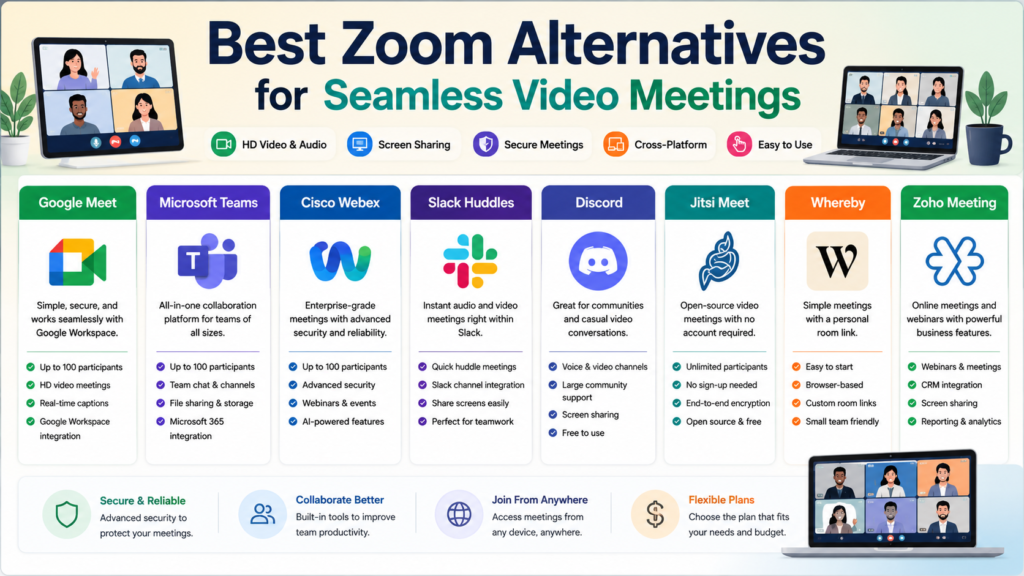
Comparison Table of the Best Zoom Alternatives
| Platform | Free Plan | Max Participants | Ideal Users | Most Useful Feature |
|---|---|---|---|---|
| Google Meet | Yes | 100 | Businesses & Students | Google Workspace Integration |
| Microsoft Teams | Yes | 100 | Enterprise Collaboration | Microsoft 365 Integration |
| Cisco Webex | Yes | 100 | Corporate Meetings | Advanced Security |
| Slack Huddles | Yes | Small Teams | Workplace Communication | Instant Audio & Video Meetings |
| Discord | Yes | Large Communities | Gamers & Communities | Voice Channels |
| Jitsi Meet | Yes | Unlimited | Privacy-Focused Users | No Account Required |
| Whereby | Yes | Small Businesses | Simple Video Calls | Web-Meeting Service |
| Zoho Meeting | Yes | Businesses | Webinars & Meetings | CRM Integration |
Why Consider the Best Zoom Alternatives?
Even though Zoom provides a fantastic video conferencing tool, it does not fit every use case. Users have different needs, and the Best Zoom Alternatives have more options.
Many companies choose tools that plug in directly to their software ecosystem. Alternatives provide better security, support larger meetings, and have cheaper subscriptions. Some just want a solution that works and does not require installing software.
The Best Zoom Alternatives have many features that fit the needs of diverse teams, such as collaboration tools, AI meeting helpers, and different types of control to help productivity.
Key Features of the Best Zoom Alternatives
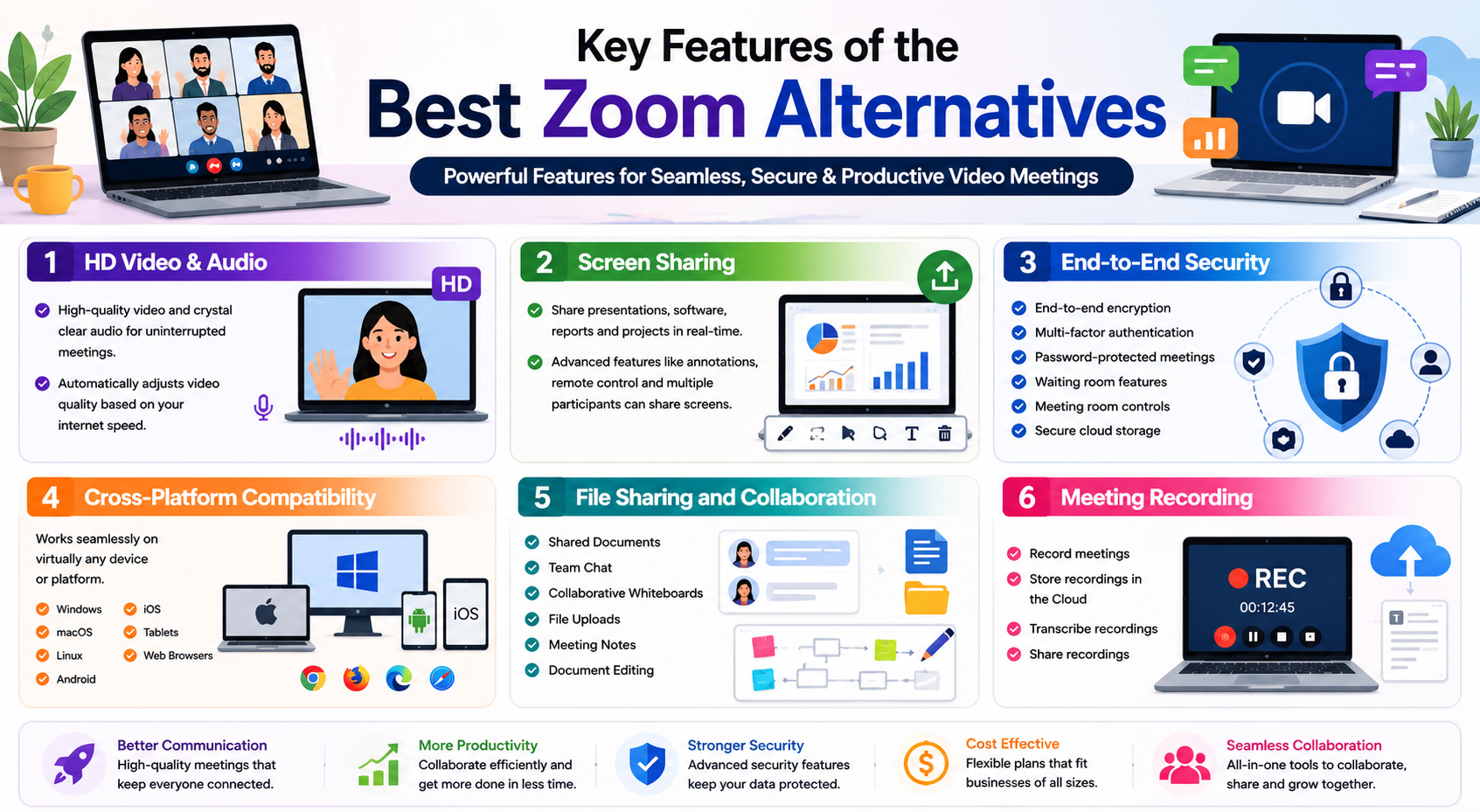
To choose the Best Zoom Alternatives, you need to know what features matter the most.
1. HD Video & Audio
Having fewer interruptions during meetings is achieved by having high-quality video and audio. Most of the services provide support for this and will adjust video quality to optimal based on the current internet speed.
2. Screen Sharing
Every meeting platform includes the ability to capture and share screens. This enables meeting participants to display presentation slides, demonstrate software to other participants, share and explain software report exports, and collaborate on and edit projects in real-time.
Zoom Alternatives have even more features, including the ability to capture shared screen annotations, control shared screens, and the ability to allow multiple participants to share their screens.
3. End-to-End Security
Security tops the list of concerns for businesses when they choose Video Conferencing Software these days.
End-to-End Security features offered by the top-rated video conferencing platforms are:
- End-to-end encryption
- Multi-factor authentication
- Password-protected meetings
- Waiting room features
- Meeting room controls
- Secure cloud storage
4. Cross-Platform Compatibility
The Best Zoom Alternatives have the ability to run on virtually every computing device.
The Best Zoom Alternatives are compatible with:
- Windows
- macOS
- Linux
- Android
- iOS
- Tablets
- Web Browsers
5. File Sharing and Collaboration
Video Calling is not the only feature that the modern meeting platform provides.
The Best Zoom Alternatives enable:
- Shared Documents
- Team Chat
- Collaborative Whiteboards
- File Uploads
- Meeting Notes
- Document Editing
6. Meeting Recording
The ability to record meetings is essential in the modern business and educational environment.
Most platforms can:
- Record meetings
- Store recordings in the Cloud
- Transcribe recordings
- Share recordings
Also Read- Blockchain Technology Guide: Unlocking the Future of Digital Innovation
Benefits of Using the Best Zoom Alternatives
There are many practical Benefits of using the Best Zoom Alternatives.
Better Value for Money
Some alternatives’ free plans are much better than Zoom’s because they allow longer meetings and include a variety of additional collaboration tools. As a result, businesses can keep in contact with high-quality communication while saving on other software costs.
Boosted Productivity
Time savings and organization are aided via calendars, task management functions, shared spaces, and AI meeting summaries.
Greater Privacy
User privacy is enhanced by platforms with encrypted meetings and protected authentication with security and privacy options.
Simplified Collaboration
Integrated chat, doc sharing, virtual whiteboards, and PM tools make for easier teamwork via the Best Zoom Alternatives.
Scalable Flexibility
One-on-One meetings or hundreds of participants in a webinar are seamlessly handled by the platforms with no decrease in quality.
Superior Integration
Many alternatives integrate into business tools such as:
- MS 365
- Google Workspace
- Salesforce
- Slack
- Trello
- Asana
- Dropbox
Having these integrations improves cross-departmental collaboration and simplifies workflows.
Widespread Applications
The Best Zoom Alternatives work for:
- Remote Workers
- Corporate
- Education
- Tutoring
- Freelancing
- Healthcare
- Customer Support
- Sales
- Webinars
- Business
Application of available alternatives means that platforms can be tailored to each need.
How to Choose the Best Zoom Alternative
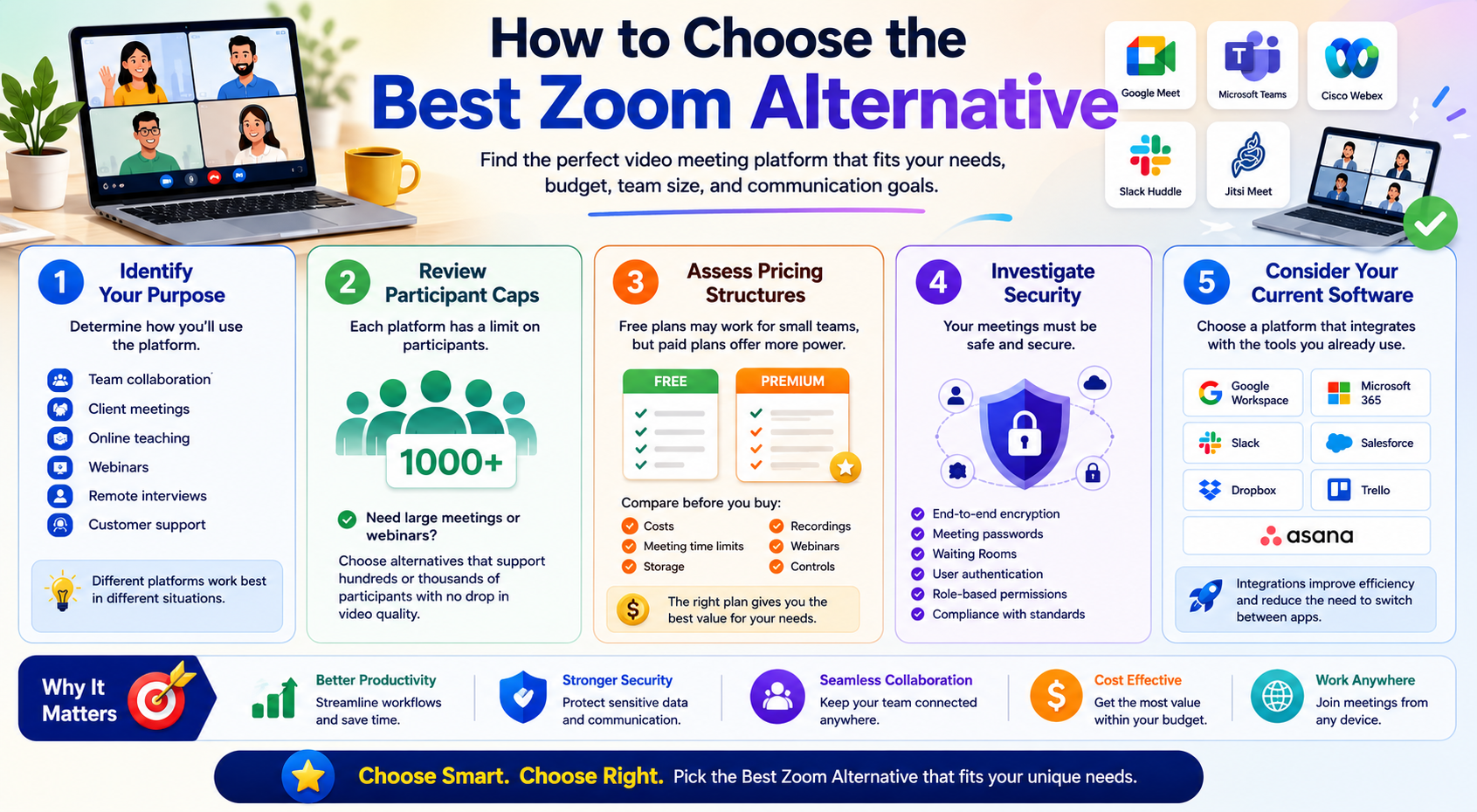
Budget, team size, and communication needs drive your selection of the Best Zoom Alternatives. Select for your needs, not just because it has the most users.
1. Identify Your Purpose
Start by determining how you’ll use the platform.
- Determine Your Function
- Establish how you will use the platform.
- Team collaboration
- Client meetings
- Online teaching
- Webinars
- Remote interviews
- Customer support
Different platforms work best in different situations. Microsoft Teams may work best for organizations using Microsoft 365, while Google Meet is optimal for businesses using Google Workspace.
2. Review Participant Caps
Each platform places a cap on participants.
Regularly hosting large meetings or webinars? Check out the Best Zoom Alternatives that allow large numbers, even thousands of participants, without sacrificing video quality.
3. Assess Pricing Structures
Free versions of video conferencing platforms may work for individuals or small teams, but large organizations may need to spring for the paid versions.
Before purchasing a subscription, assess the following:
- Costs
- Meeting time limits
- Storage
- Recordings
- Webinars
- Controls
The right pricing plan makes sure you get the best price for your needs.
4. Investigate Security
Price and features mean nothing if you can’t have a safe and secure meeting.
The Best Zoom Alternatives should incorporate:
- End-to-end encryption
- Meeting passwords
- Waiting Rooms
- User authentication
- Role-based permissions
- Compliance with security standards
5. Consider Your Current Software
A meeting platform becomes far more useful when it connects with the software you already use.
Look for integrations with:
- Google Workspace
- Microsoft 365
- Slack
- Salesforce
- Dropbox
- Trello
- Asana
These integrations improve efficiency and reduce the need to switch between applications.
Also Read- Best Antivirus Software: Ultimate Protection for Every Device
The Evolution of Video Conferencing Technology
The Best Zoom Alternatives are introducing intelligent features that improve collaboration and meeting efficiency, and we are only beginning to see the rapid improvements in video conferencing.
Key emerging trends feature:
- AI meeting summary generation
- Live transcription automation
- Noise cancellation
- Instant language translation
- AI to schedule meetings
- AI virtual meeting backgrounds
- Gesture recognition technology
- Meeting analytics
- Improved cloud collaboration
- Advanced cybersecurity
Remote and hybrid work will continue to evolve and expand, and these trends will improve the usability of online communication.
Best Practices to Use the Best Zoom Alternatives
Make sure to adhere to the following if you want to have the best meeting experience:
- Make sure you have a good internet connection.
- Use a good quality headset.
- Keep everything updated.
- Use meeting passwords.
- Do a Microphone and camera check.
- Share screen only when necessary.
- Meeting recording can be done for important meetings.
- Have a meeting agenda.
- Mute when you aren’t speaking.
- Use the collaboration features.
Making meetings virtual is easier, quicker, and more professional when you take these practices into consideration.
Conclusion
Users have more options when it comes to virtual communication platforms than ever before, making it of utmost importance to select Zoom Alternatives that will best cater to your needs. Zoom is still a widely used option, but many alternatives are comparable to or better than Zoom for collaboration, integration, cybersecurity, and most of all, AI and price flexibility.
Using the conferencing solution that most naturally integrates into your business, education, or freelancing, you’ll empower your workflows and optimize productivity by communicating seamlessly and securely.
Implementing the Best Zoom Alternatives can help teams work better together, minimize interruptions, and provide an overall better online meeting experience.
Frequently Asked Questions (FAQs)
1. What are the Best Zoom Alternatives?
Google Meet, Microsoft Teams, Cisco Webex, Jitsi Meet, Whereby, Zoho Meeting, Discord, and Slack Huddles are some of the Best Zoom Alternatives. All these platforms have something different to offer to different users and different organizations.
2. Are Zoom alternatives free?
Yes. A lot of the Best Zoom Alternatives have free plans that include the basics such as HD video meetings, screen sharing, chatting, and limited recorded meetings. Other plans offer more features and functionality.
3. Which Zoom alternative is best for businesses?
Microsoft Teams and Cisco Webex are among the best Zoom alternatives for businesses since both include security at a high level, and business collaboration and productivity tools.
4. Which Zoom alternative is best for students?
Google Meet is a great Zoom alternative for students and teachers since it’s easy to use and integrates seamlessly with both Google Classroom and Google Workspace.
5. Are Zoom alternatives secure?
The Best Zoom Alternatives use security at a high level and include features such as encryption, passwords for meetings, waiting rooms, some authentication of users, and admin controls to help secure user privacy.
6. Can I record meetings on Zoom alternatives?
Yes, most of the platforms that are industry leaders allow participants to record meetings either to their local device or to the cloud, depending on what plan they are subscribed to.
7. Which software-free Zoom alternative is the most popular?
The most popular Zoom alternatives with little or no software installation are Jitsi Meet and Whereby. They both allow users to join meetings using a web browser.
8. What are the criteria for choosing the best Zoom alternatives?
Meeting size, budget, and security are the primary pieces of criteria. On the other hand, collaboration style, integration, and device requirements are the secondary pieces of criteria. You will have the optimal Zoom alternative for your needs if you consider and compare the primary and secondary criteria.
The best Zoom alternatives do not only focus on offering video conferencing solutions. The best alternatives focus on communication and collaboration offerings, and the alternatives do not focus on the solutions pertaining to remote work, online learning, and other virtual activities. The right alternative provides secure and seamless video meetings to keep your teams connected.